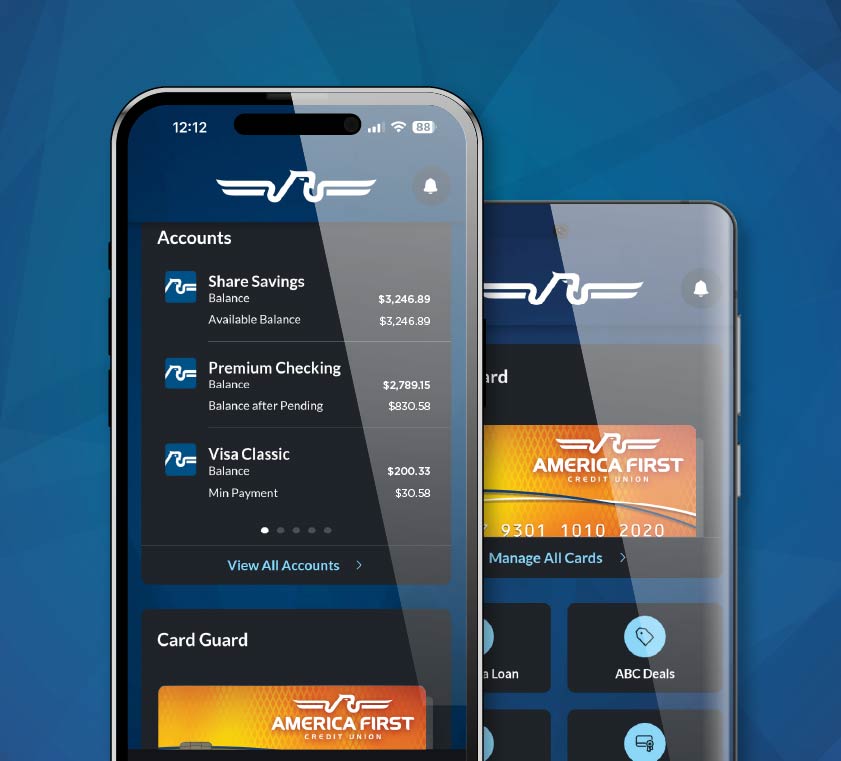
DIGITAL BANKING

America First Credit Union Online Banking

Member access to accounts, transfers, bill pay, and mobile deposit — 24/7 at secure.americafirst.com.

America First Credit Union online banking is a free member service that gives 1.5 million AFCU members 24-hour access to checking, savings, certificates, and loan accounts from any laptop, desktop, phone, or tablet. The platform is hosted at secure.americafirst.com and supports the same single User ID and password as the AFCU mobile app.

How online banking works at AFCU

America First Credit Union (AFCU) operates a single unified digital banking platform. Members enroll once and use the same credentials whether they sign in through a browser at americafirst.com or through the AFCU mobile app for iOS and Android. Sign-in lives at secure.americafirst.com, which is the SSL-encrypted member portal separated from the marketing site at americafirst.com. The portal is built on the credit union's core banking system, so balances, transfers, and bill-pay actions post in real time across all channels.

The platform serves all 116 AFCU branches across Utah, Nevada, Arizona, Idaho, New Mexico, California, and Oregon. Because routing number 324377516 is the same across the entire institution, online banking transfers, ACH direct deposits, and wire instructions use one identifier regardless of which branch opened the account. Member service for online banking issues runs through 1-800-999-3961, the same line that handles general account questions.

Signing in for the first time

  1. Enroll from the login page.Visit secure.americafirst.com and click Enroll in Online/Mobile Banking. You will need your AFCU member number, Social Security number, and date of birth on file.
  2. Create your User ID and password.Passwords must be 8 to 32 characters with at least one letter and one numeral. The same credentials will work later on the mobile app, Quicken, and QuickBooks integrations.
  3. Set up multi-factor authentication.AFCU sends a one-time verification code by text, voice call, or email when it detects sign-in from a new device or unusual location.
  4. Confirm contact information.Verify your phone, email, and mailing address inside Settings so balance alerts, fraud notifications, and statement delivery work without delay.
  5. Choose statement and alert preferences.Enroll in free e-statements to reduce mailbox clutter; switch on low-balance and large-transaction alerts to keep an eye on activity.

What members can do once signed in

The post-login dashboard surfaces all checking, savings, certificate, and loan balances on one page, with up to 15 accounts visible by default. Members can reorder accounts, hide low-priority ones, and drill into any account for 90 days of recent transactions. Beyond balance look-ups, the platform supports the full set of self-service banking actions members would otherwise complete at a branch.

$23.3Bin member assets
1.5M+members
116branches
30K+surcharge-free ATMs

Core online banking features

Sign-in URL
secure.americafirst.com
SSL/TLS encrypted member portal
Routing Number
324377516
For ACH transfers and direct deposit
Member Phone
1-800-999-3961
Online-banking support included
Statements
24 months
PDF download in Quick Links

Transfers, bill pay, and Zelle

The Transfers tab handles one-time and recurring movements between AFCU accounts, payments toward AFCU loans, and external account-to-account transfers using routing number 324377516. Pending transfers can be edited or cancelled via the red X icon next to each item, except for loan repayment agreements, which require a call to 1-800-999-3961 to modify. Bill Pay supports both biller-direct electronic payments and printed checks for payees that do not accept electronic deposits. Zelle, integrated into the same dashboard, sends person-to-person payments using a recipient's email or US mobile number, with no fee for AFCU members.

Mobile check deposit through the browser

While most members deposit checks through the AFCU mobile app camera, the browser version of online banking accepts deposits via uploaded image files for users on desktop devices with scanners. Endorse the check with For Mobile Deposit Only at AFCU, upload images of the front and back, and confirm the deposit amount. Funds typically post within one business day, subject to standard funds-availability holds.

Statements, tax forms, and Money Manager

Online banking holds 24 months of monthly statements as PDF downloads under Statements in Quick Links. Year-end tax forms — 1099-INT for interest earned on savings and certificates, 1098 for mortgage interest paid, and 1099-R for IRA distributions — also live in this section. The integrated Money Manager tool aggregates external bank accounts, categorizes transactions, and supports budget building. Categorization rules sync between mobile and online banking, so a budget set up in either channel applies everywhere.

Overview & Key Features

America First Credit Union online banking is the 24/7 digital member portal for the 6th largest US credit union, with 1.5 million members across seven western states. It runs at secure.americafirst.com and supports the same credentials as the AFCU mobile app, giving members one sign-in to manage checking, savings, loans, and bill pay across web and mobile.

  • Sign-in URL: secure.americafirst.com — separate from the americafirst.com marketing site
  • Single Credentials: same User ID and password for web, mobile, Quicken, and QuickBooks
  • Multi-Factor Authentication: one-time codes by text, voice call, or email for new-device sign-ins
  • Transfers: internal, external, loan payments, and recurring schedules — no member fees
  • Bill Pay: free electronic and check payments to any US payee
  • Zelle: integrated person-to-person payments using email or US mobile number
  • Mobile Deposit: upload check images directly in the browser dashboard
  • Money Manager: free budgeting tool with external-account aggregation and category tracking

Security and session protection

Online banking sessions use TLS 1.2 or higher with HTTPS-only cookies. The platform automatically signs users out after 15 minutes of inactivity and detects unusual sign-in attempts using device fingerprinting and geolocation flags. Account-takeover protection is layered with multi-factor authentication, Card Guard for debit and credit card controls, and round-the-clock fraud monitoring. AFCU is federally insured by the National Credit Union Administration up to $250,000 per depositor per ownership category, identical to FDIC coverage at banks.

People also ask about America First online banking

How do I sign in to America First online banking?

Visit secure.americafirst.com and enter your member User ID and password. First-time users must select Enroll in Online/Mobile Banking on the same page and verify member number, Social Security number, and date of birth before creating credentials.

Why am I getting a system unavailable message at login?

The most common fix is clearing the browser's cookies and cache for americafirst.com, then restarting the browser. If the message persists, try a different browser or device. AFCU members can also call 1-800-999-3961 for live online-banking troubleshooting.

What are the AFCU password requirements?

Passwords must be 8 to 32 characters long and contain at least one letter and one numeral. The same password is used for online banking, mobile banking, Quicken, and QuickBooks integrations. PINs are reserved for ATM, debit, and telephone banking — they do not work for online sign-in.

Is America First online banking the same as the mobile app?

Yes. Online banking and the AFCU mobile app share one credential set and one underlying account view. Enrolling on the web automatically enables sign-in on iOS and Android; biometric Face ID or fingerprint can be added later inside the mobile app for faster access.

How many months of statements does AFCU online banking keep?

The portal stores the most recent 24 months of monthly statements as PDF downloads under Statements in Quick Links. Year-end tax documents including 1099-INT, 1098, and 1099-R forms are also available here for the current and prior tax year.

Frequently Asked Questions

Is AFCU online banking free?

Yes. There is no monthly fee for online banking, bill pay, e-statements, internal transfers, mobile deposit, or Zelle for AFCU members.

Can I categorize my transactions?

Yes — through Money Manager. Categorization syncs across mobile and online banking, so budgets and spending reports stay consistent on every device.

Can AFCU send alerts to my phone?

Yes. Account alerts can be delivered as push notifications through the mobile app, SMS text messages, or email. Low-balance, large-transaction, and login alerts can be configured per account.

How do I cancel a pending transfer?

Open the Transfers tab, scroll to the pending list, and click the red X icon next to the transfer. Loan repayment transfers cannot be edited online — call 1-800-999-3961 to modify those.